NPS Government Employees Registration - Latest Online Process aur DDO Guide | JobGati

Central aur State Government employees ke liye NPS (National Pension System) Tier 1 registration ka latest process - DDO role, 14% employer contribution (new regime), PRAN generation aur salary deduction ka poora guide.

NPS Government Employees Registration - Latest Online Process aur DDO Guide | JobGati

NPS Government Employees Registration - Latest Online Process aur DDO Guide | JobGati

Agar aap kisi Central ya State Government department mein 1 January 2004 ke baad join hue hain, toh aapke liye National Pension System (NPS) ke under Tier I account mandatory hai. Ministry of Finance ne 22 December 2003 ki Press Release mein ye rule notify kiya tha.

Is article mein hum cover karenge — DDO (Drawing & Disbursing Officer) ke through PRAN generation, salary se NPS contribution ki deduction, 14% employer contribution (Section 80CCD(2)), PFM selection aur retirement par corpus management. Sab kuch Hinglish mein.


📌 Table of Contents (Quick Navigation)

  • NPS Government Employees: Quick Overview
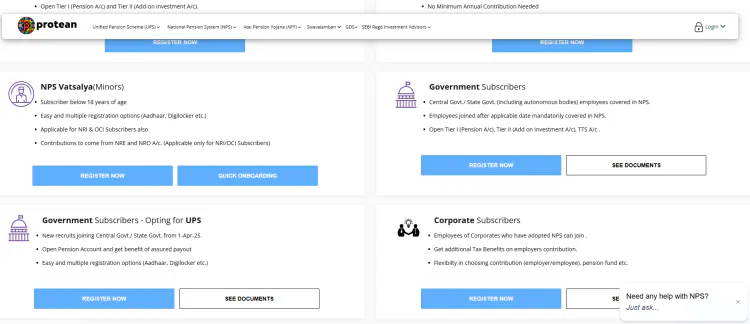
  • Step-by-Step Registration aur DDO Workflow
  • Direct Official Links
  • Pro Tip & Related Tools
  • Frequently Asked Questions (FAQs)

NPS Government Employees Registration: Quick Overview

Feature / Service Official Details
Applicable To Central Govt + State Govt + Central/State Autonomous Bodies ke employees jo 1 Jan 2004 ke baad join hue
Applicable Notification Notification No. 5/7/2003-ECB (Ministry of Finance, Department of Economic Affairs), Press Release dated 22 Dec 2003
Default Investment Scheme Standard Scheme (default allocation among 3 PSU PFMs: SBI Pension Funds, LIC Pension Fund, UTI Pension Fund)
Employee Contribution 10% of Basic + DA (deducted from salary)
Employer Contribution 14% of Basic + DA (New Tax Regime) or 10% (Old Tax Regime), under Section 80CCD(2)
Key Requirements PRAN form (Form S1), photo, signature, ID proof, DDO verification
Official Portal Link cra.nps-proteantech.in (subscriber login) + enps.nps-proteantech.in
Processing Authority DDO generates PRAN, Protean eNPS (CRA) issues PRAN card
Tax Benefit 80CCD(1) employee up to 10% of basic + 80CCD(1B) extra ₹50,000 + 80CCD(2) employer 14% (above ₹1.5L cap)
Subscriber Base Central Govt: ~24 lakh + State Govt: ~61 lakh (April 2023 data, latest verified)

Step-by-Step Guide: NPS Government Employee Registration Kaise Hoti Hai

Government employees ke liye registration directly employer ke through hota hai (self-registration nahi hoti). Neeche poora process hai with DDO role:

Step 1: Joining Form Mein NPS Selection Confirm Karein

Joining ke time aapko ek PRAN Application Form (S1) bharna hota hai jo aapka DDO/Cadre Controlling Authority provide karti hai. Form mein apna full name (as per service record), father's name, date of birth, Aadhaar, PAN aur permanent address fill karein. Form par photo (passport size) aur signature lagayein.

⚠️ Important: Government employees ke liye Tier I mandatory hai - koi opt-out option nahi hai 1 Jan 2004 ke baad join hone walo ke liye. Armed forces ke liye alag pension scheme applicable hai.

Step 2: DDO Verification aur Forwarding

Form bharne ke baad DDO (Drawing & Disbursing Officer) form verify karta hai - naam, designation, pay level, basic+DA sab cross-check hota hai. DDO apna office code aur DDO registration number form mein daalta hai. Verified form PAO (Pay & Accounts Office) / PrAO / CDDO ke through Protean eGovernance (Central Recordkeeping Agency) ko forward hota hai.

Smart processing tips:

  • DDO office code apne department se confirm karein - galat code se form reject ho sakta hai
  • Photo specifications: 3.5 cm x 3.5 cm, white background, recent photo
  • Signature: Black pen se, signature block ke andar
  • Form submission mode: Department ke rules par depend karta hai - paper-based ya digital

Step 3: PRAN (Permanent Retirement Account Number) Generation

Protean form receive karne ke baad 12-digit unique PRAN generate karta hai. PRAN aapki life-long identity hai - jab tak aap govt service mein ho, ya retirement ke baad bhi corpus manage karne ke liye. PRAN aane ke baad Protean PRAN card post/courier karta hai DDO ke through aapko.

Important distinctions:

  1. PRAN = 12-digit all-India unique (lifetime fixed)
  2. Subscriber ID = department-specific (transfer par change hota hai)
  3. DDO Code = specific to your office (transfer par change hota hai)
  4. Employee Code = internal HR identifier

Step 4: PFM (Pension Fund Manager) Selection

By default govt employees ka paisa 3 PSU PFMs mein Standard Scheme ke under equally distribute hota hai:

  1. SBI Pension Funds (33.33%)
  2. LIC Pension Fund (33.33%)
  3. UTI Pension Fund (33.33%)

Employee chahe toh Auto Choice (LC-50 / LC-25 / Scheme G) choose kar sakta hai. Active Choice bhi available hai lekin PFRDA ne initially govt employees ke liye Standard Scheme rakha tha - ab Active Choice bhi allowed hai after subsequent notifications. PFM ko khud select karna ho toh eNPS portal / Protean CRA par login karke change request de sakte hain.

Step 5: Salary Se NPS Contribution Deduction

Har mahine aapki salary se 10% of (Basic + DA) employee contribution auto-cut hota hai aur aapke PRAN mein credit hota hai. Saath hi 14% (New Tax Regime) ya 10% (Old Tax Regime) of (Basic + DA) employer (sarkar khud) bhi contribute karta hai.

Total monthly contribution breakdown:

  • New Tax Regime: Employee 10% + Employer 14% = 24% of (Basic + DA)
  • Old Tax Regime: Employee 10% + Employer 10% = 20% of (Basic + DA)
  • Yeh sab DDO aur PAO ke through Protean system mein update hota hai
  • Voluntary additional contribution (VVC) bhi kar sakte hain 80CCD(1B) ke under

Step 6: PRAN Account Statement Check Karein

PRAN active hone ke baad har quarter Protean Statement of Account (SoA) issue karta hai. Aap cra.nps-proteantech.in par login karke apni SoA online bhi dekh sakte hain. Holding statement mein contribution, NAV, units allocated aur total corpus dikhai deta hai. Annual tax statement bhi available hota hai ITR filing ke liye - 80CCD(1) aur 80CCD(1B) ka total claim yahan dikhai deta hai.

💡 Helper: Agar koi discrepancy lage toh DDO aur Protean CRA helpdesk (1800-266-5567) par turant contact karein. Har mismatch ko 30 din ke andar raise karein for quick fix.


⚡ Direct Official Links For NPS Government Employees

🔒 Official Source Verification: Sabhi niche diye gaye links direct Government of India ke official portal se hain. Notification No. 5/7/2003-ECB Ministry of Finance ka hai. JobGati par koi bhi fake ya third-party link pradan nahi kiya jata.

Service Name Direct Official Link
eNPS Registration (All Citizen) Click Here for eNPS
PFRDA Official Site Click Here for PFRDA
Protean CRA Portal (Subscriber Login) Click Here for Protean CRA
NPS Trust (Subscribers) Click Here for NPS Trust
Ministry of Finance - NPS Info Click Here for Min. of Finance
NPS Helpline (Toll Free) 1800-266-5567 (Protean Helpline)

💡 JobGati Pro Tip & Recommended Tools

Government employees ke liye sabse bada advantage ye hai ki retirement ke baad corpus ka 60% tax-free nikal sakte hain aur 40% se annuity (monthly pension) kharidna mandatory hai. Bahut se govt employees retirement ke baad ye nahi samajhte ki unka corpus actually kitna banega aur monthly pension kitni milegi. JobGati ka Pension Calculator use karke aap abhi se plan kar sakte hain - bas apne monthly contribution, expected return aur retirement age daalein, aur exact corpus + monthly annuity estimate paayein. Ye un govt employees ke liye zyada useful hai jo voluntary additional contribution (VVC) karte hain apni tax savings badhane ke liye.

Recommended Tool: Pension Calculator - apne NPS contributions aur VVC daalein aur exact retirement corpus + monthly pension dekhein (free, Hinglish UI).

Related Article: NPS Individual Subscriber Registration Online Guide - agar aap govt job chhod ke private sector ya self-employment join karein, toh All Citizen Model ke through apna NPS continue kar sakte hain. NPS Corporate Employees Registration Guide - private sector employer NPS scheme ka full process.

Contextual Tool Routing

For Tax Saving Strategy: Income Tax Calculator (Old vs New Regime) (sarkari karmchari ke liye optimal tax regime decide karein)

For Retirement Planning: PPF/SSY/NSC Maturity Calculator (alternative govt-backed schemes ke returns dekhein)


❓ Frequently Asked Questions (FAQs)

Q1. Kya har government employee ka NPS Tier I mein hona mandatory hai?

Ans: Haan, 1 January 2004 ke baad join hone wale sabhi Central / State Government aur Autonomous Body employees ke liye NPS Tier I mandatory hai (Notification No. 5/7/2003-ECB). Armed forces ke liye alag pension scheme hai, baaki sabhi civilian employees ke liye NPS Tier I compulsory hai. Opt-out ka koi provision nahi hai - ye aapka statutory right hai aur sarkar aapki taraf se contribute karti hai.

Q2. Govt employees ka NPS contribution kitne percent hota hai?

Ans: Employee contribute karta hai 10% of (Basic + DA) aur employer (sarkar) contribute karti hai 14% (New Tax Regime) ya 10% (Old Tax Regime) of (Basic + DA), under Section 80CCD(2). Total mahine ka 24% (new) ya 20% (old) of basic+DA PRAN mein jaata hai. Employee 80CCD(1B) ke under extra ₹50,000 ka voluntary contribution kar sakta hai aur usse apni tax saving badha sakta hai.

Q3. Kya govt employee apna PFM change kar sakta hai?

Ans: Haan, ek financial year mein ek baar PFM (Pension Fund Manager) change kar sakte hain. Active Choice bhi available hai jo private sector jaisa khud asset allocation decide karne ka option deta hai (Scheme E up to 75% equity, Scheme C, G, A). Default Standard Scheme se hat ke agar koi active choice nahi select ki toh Standard Scheme hi applicable rehta hai.

Q4. Govt employee retirement par kya rules hain?

Ans: 60 saal ki age par 60% corpus tax-free lump sum nikal sakte hain, baaki 40% se annuity (monthly pension) kharidna mandatory hai (any authorised Indian insurance company se - LIC, SBI Life, ICICI Pru, HDFC Life, etc.). Agar corpus ₹5 lakh se kam hai toh 100% lump sum allowed hai (but 40% portion taxable). Corpus > ₹5 lakh par minimum 40% annuity mandatory.

Q5. Kya govt employee ka PRAN service ke dauran change hota hai?

Ans: Nahi, PRAN life-long fixed rehta hai. Agar aap transfer hote ho (Central se State, ya ek department se dusre), toh wahi PRAN continue rehta hai - sirf Subscriber ID aur DDO change hota hai. PRAN lost hone par Protean CRA se duplicate PRAN card mil sakta hai.


🔔 Sarkari Yojana aur Exam Updates Sabse Pehle Paayein: Har nayi update ke liye JobGati.com ko Bookmark (Ctrl+D) zaroor karein!


⚠️ Important Disclaimer: JobGati ek swatantra shiksha aur sochna portal hai. JobGati ka kisi bhi sarkari sanstha ya vibhag se koi sidha sambandh nahi hai. Hum keval aam nagrikon aur students ki suvidha ke liye verified jankari aur official links provide karte hain. NPS contribution rules, employer limits, aur DDO process publish karne se pehle PFRDA / Protean eNPS / concerned department official portal se confirm karein — kyunki govt policies frequently update hoti hain.

What's Your Reaction?

like

dislike

love

funny

angry

sad

wow

JobGati.com founder. Simplifies Indian government processes (UIDAI, Parivahan, SSC, etc.) in Hinglish. Every guide: direct portal visit + screenshot + verification. Only official .gov.in links. 24hr updates. Independent educational portal.

Comments