Income Tax Return Filing Guide Online Process | JobGati
Income Tax Return Filing Guide — Step by Step ITR Online | JobGati Kya aapne Income Tax Return (ITR) file kar diya hai? Aga
Income Tax Return Filing Guide — Step by Step ITR Online | JobGati
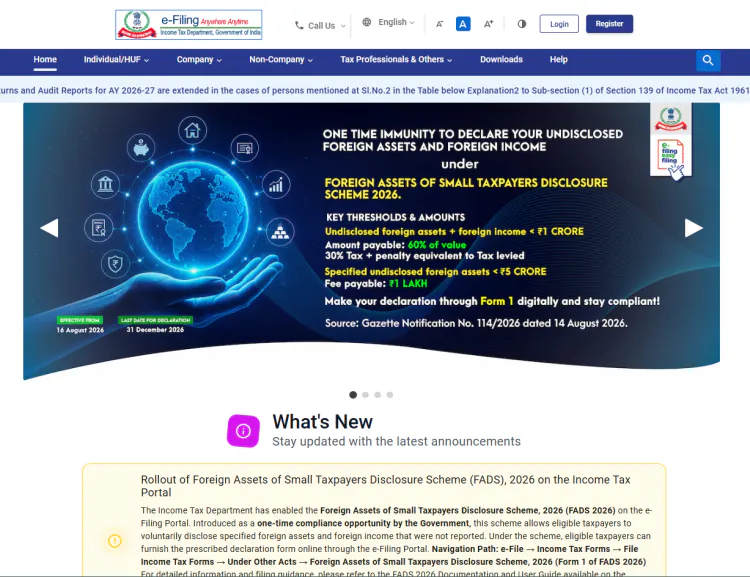
Kya aapne Income Tax Return (ITR) file kar diya hai? Agar nahi, toh late ho raha hai! ITR filing har sal 31 July tak (general taxpayers ke liye) hoti hai. Late filing par penalty bhi lagti hai. Income Tax Return online file karna aajkal bahut simple hai — bas incometax.gov.in par jayein, register karein, form bharein, submit karein. Is guide mein main aapko step-by-step batata hoon ki kaise ITR file karein.
📌 Table of Contents (Quick Navigation)
- Quick Overview
- ITR Filing Ka Step-by-Step Tareeka
- Kitne Types Ke ITR Hain? Choose Sahi Form
- Documents Required for ITR Filing
- Direct Official Links For Income Tax Services
- Pro Tip & Recommended Tools
- FAQs
📋 Quick Overview: Income Tax Return Filing
| Feature / Service | Official Details |
|---|---|
| Official Authority | Central Board of Direct Taxes (CBDT) |
| Service Type | Online Income Tax Return Filing |
| Key Requirements | PAN, bank account, Form 16/A, Investment proofs |
| Last Date (General) | 31 July (FY 2025-26) |
| Official Portal Link | https://www.incometax.gov.in/iec/foportal |
| Filing Fee | Free online, ₹500 late fee if after due date |
📝 ITR Filing Online Karne Ka Step-by-Step Tareeka
Step 1: Income Tax Portal Par Register/Login Karein
incometax.gov.in par jaayein. Agar pehli baar aa rahe hain toh Register karein — PAN, naam, DOB, mobile number se OTP verify hoga. Existing user hain toh Login karein.
Step 2: ITR Form Select Karein
Dashboard par "File ITR" button dhundhein. Apna income type dekh kar sahi form select karein:
- ITR-1 (Sahaj): Salary, one house property, interest income — general taxpayers ke liye
- ITR-2: Capital gains, multiple house properties, foreign income
- ITR-3: Business/profession income wale taxpayers
- ITR-4 (Sugam): Presumptive taxation (business ya profession)
Step 3: Personal Details Fill Karein
Auto-filled details verify karein — naam, address, bank account, PAN. Bank account number aur IFSC code sahi hone chahiye refund ke liye.
Step 4: Income Details Enter Karein
Salary income: Form 16 se copy karein. Interest income: Bank statements se. Capital gains:broker statement se. House property: Rent received/paid details. Self assessment tax paid: Previous year ka detail.
Step 5: Deductions Claim Karein (Section 80C to 80U)
Agar aapne investments kiye hain (PPF, ELSS, NPS, insurance premium, etc.) toh unke proofs enter karein. 80C mein max ₹1.5 lakh deduction milta hai.
Step 6: Tax Calculation Aur Verify Karein
System automatically tax calculate karega. New regime vs old regime compare karke dekhein kaunsa better hai. Pre-validate button dabakar details check karein.
Step 7: E-Verification Karein
Submit ke baad E-Verification karna mandatory hai. Options hain:
- Net Banking/ Aadhaar OTP: Instant verification
- Bank Account OTP: Pre-validated bank account se
- Send Physical Form: Print karke sign karke bhejein (slow method)
E-Verify karne ke baad ITR successfully file ho jata hai. ACKNOWLEDGMENT download karke save kar lein.
📊 ITR Forms — Kaunsa Form Konsi Situation Ke Liye?
| Form | Kiske Liye? | Complexity |
|---|---|---|
| ITR-1 (Sahaj) | Salary + 1 House Property + Interest Income | Easy ⭐ |
| ITR-2 | Capital Gains, Multiple Houses, Foreign Assets | Medium |
| ITR-3 | Business/Profession Income | Hard |
| ITR-4 (Sugam) | Presumptive Taxation (Business/Profession) | Medium |
| ITR-5 | Firms, LLPs, AOPs, BOIs | Hard |
📄 Documents Required for ITR Filing
| Document | Kyun Chahiye? |
|---|---|
| Form 16 (Salary) | Annual salary breakdown, TDS details |
| Form 26AS | All TDS credits consolidated view |
| AIS/TIS | Complete financial information from govt |
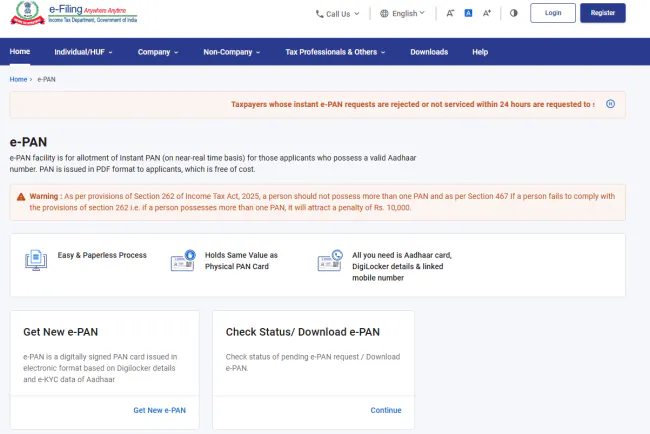
| PAN Card | Mandatory identification |
| Bank Statement | Interest income, investment details |
| Investment Proofs | 80C, 80D, NPS deductions ke liye |
| Interest Certificate | FD/SCB interest income proof |

⚡ Direct Official Links For Income Tax Services
🔒 Official Source Verification: Niche diye gaye sabhi links direct official government portals (.gov.in) se verified hain. JobGati par koi bhi fake ya third-party payment link provide nahi kiya jata.
| Service | Official Link |
|---|---|
| Income Tax Portal (Login/Register) | https://www.incometax.gov.in/iec/foportal |
| Form 26AS Download | https://www.incometax.gov.in/iec/foportal/#/pre-login/tds-form-26as-txis |
| AIS/TIS Download | https://www.incometax.gov.in/iec/foportal/#/pre-login/ais-tis |
| ITR Forms Download | https://www.incometax.gov.in/iec/foportal/forms |
| Refund Status Check | https://www.incometax.gov.in/iec/foportal/#/refund-status-check |
💡 JobGati Pro Tip & Recommended Tools
ITR file karte waqt New vs Old Tax Regime ka comparison zaroor karein. Aksar naya regime beneficial hota hai kyunki isme exemptions kam hote hain par rates bhi kam hain. Apne Form 26AS aur AIS ko ITR se match karein taake koi missing entry na rahe.
Recommended Tool: Income Tax Calculator (Old vs New Regime) — dono regimes ka tax compare karein aur save karein
Related Article: Income Tax Slab Old vs New Regime Guide — slab rates aur limits ki detail samjhein
Contextual Tool Routing
Word Character Counter — ITR form mein kuch fields ka character limit hota hai, check karein
Image Compressor — signature/photo ka size kam karein upload ke liye
CGPA to Percentage — education details fill karte waqt conversion karein
❓ Frequently Asked Questions (FAQs)
Q1: ITR file karne ki last date kya hai?
Ans: General taxpayers ke liye 31 July hai (FY 2025-26 ke liye). Supreme Court order ke baad yeh date extend ho sakti hai, isliye latest news check karte rahein.
Q2: Late filing par kya penalty lagti hai?
Ans: Last date ke baad file karne par ₹500 se ₹5,000 tak late fee lagti hai (income level par depend karta hai). Additional penalty bhi ho sakti hai.
Q3: New regime ya old regime — kaunsa best hai?
Ans: Yeh aapke income aur investments par depend karta hai. Agar aapke paas zyada investments hain (80C, 80D, HRA, etc.), toh old regime behtar ho sakta hai. Otherwise new regime simpler hai.
Q4: ITR file karne ke baad refund kab milega?
Ans: Typically 2-6 months mein refund aata hai. Agar aapne E-Verification kar diya hai aur sab documents sahi hain, toh faster processing hoti hai.
🔔 Income Tax Updates Sabse Pehle Paayein: Har naya update, guide aur free tool ke liye JobGati.com ko Bookmark (Ctrl+D) zaroor karein!
⚠️ Important Disclaimer: JobGati ek swatantra shiksha portal hai, government ka official website nahi. Yahan di gayi jaankari sarkari notifications par aadharit hai, lekin final aur updated jaankari ke liye hamesha official website https://www.incometax.gov.in check karein. JobGati kisi bhi tarah ki bharti ya recruitment ke liye liable nahi hai.
What's Your Reaction?










Comments